Reverse Engineering Titanium APKs: Recovering Lost Source Code
Built three npm packages to extract JavaScript source from compiled Android apps

The Problem
A potential client reached out with a common disaster scenario: they had a production Android app built by a freelance developer, but no source code. The developer was gone. The app needed updates.
Their question: Can you recover the source code from the APK?
My answer: Let me find out.
The app was built with Appcelerator Titanium—a framework I knew well since I was actively building compilers that generated Titanium code. This wasn't just a client problem anymore—it was a technical challenge I wanted to solve.
Understanding APK Structure
APKs are essentially ZIP files with a specific structure. Any Android developer knows you can unpack them with the right tools.
Standard APK contents:
resources.arsc- Compiled resourcesclasses.dex- Dalvik bytecode (Java classes)AndroidManifest.xml- Binary manifest- Assets folder - Images, sounds, fonts, layouts
Standard reverse engineering tools:
- apktool - Extracts assets and decrypts manifests
- dex2jar - Converts DEX to JAR format
- JD/JADx - Decompiles Java classes back to source
But Titanium apps are different. They market themselves as "JavaScript compiled to native"—which means the JS code isn't sitting in the resources folder like Ionic apps.
The question: Where is Titanium hiding the source code?
Building the Tool Chain
I needed custom tooling. No existing solution did what I needed, so I built three npm packages.
APK_unpack - Resource Extraction
Existing APK tools are CLI-based and clunky for automation.
Built a Node.js package that wraps apktool with a Java bridge for one-step resource extraction.
First Node.js app consuming Java classes directly. Interesting integration problem.
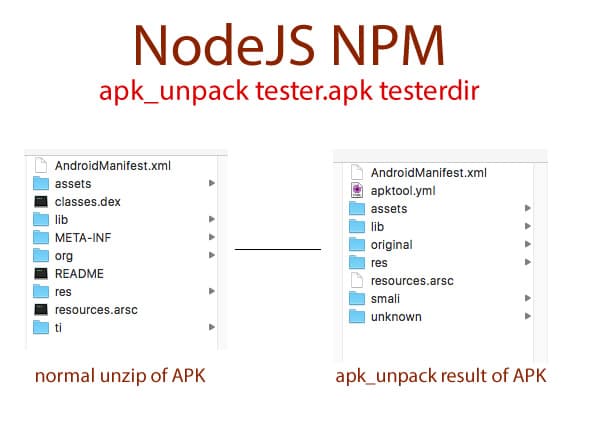
APK_unpack in action - extracting resources, manifest, and assets from a compiled Android app
ti_unpack - Titanium Code Extraction (The Breakthrough)
Where does Titanium store the JavaScript source in compiled APKs?
Discovered Titanium encodes source code in AssetCryptImpl file using obfuscation, not real encryption.
Successfully extracted entire application source code from production APKs.
Titanium promotes itself as "JavaScript compiled to native," so it was no surprise the JS files weren't in the resources folder like Ionic apps. For developer-mode APKs, the source is there—but production builds? Hidden.
I needed to find where Titanium was hiding the JavaScript. Started Googling variations of "titanium apk structure," "titanium source code location," "titanium encryption."
Found a SlideShare presentation titled "Help Doctor, My Application is an Onion" explaining Titanium's packaging structure. The JavaScript source lives in a file called AssetCryptImpl in the main package directory.
The presentation outlined the encryption format and how to decrypt it. Perfect—now I just needed to implement it.
Created a JavaScript/Node.js implementation that:
- Locates the AssetCryptImpl file in the APK
- Reads the encrypted bundle structure
- Decrypts using the embedded encryption keys
- Extracts all JavaScript files into memory
The "encryption" is really obfuscation—the decryption key must be in the app itself for it to run. This is a fundamental limitation of client-side encryption.
Ran the unpacker on the client's APK. It worked. The entire application source code—controllers, views, models, utilities—all extracted, readable, and recoverable.

Successfully recovered - the entire Titanium app source code extracted and visible in memory
This was both exciting and frightening. I had published dozens of Titanium apps to app stores. Now I knew exactly how recoverable they were.
ti_recover - Project Structure Restoration
Having the code in memory isn't enough—developers need the original project structure.
Built a recovery tool that reconstructs proper Titanium project structure from the extracted code.
Complete, working Titanium project ready for development. Different Titanium versions minify code differently, so I had to reverse that.
What I Learned
On code security: This frightened me. I had published dozens of Titanium apps to app stores. Now I knew exactly how recoverable they were.
On obfuscation vs encryption: Titanium's "encrypted" assets are really just obfuscated. With the right tools and understanding of the format, recovery is straightforward.
On protecting intellectual property: If source code protection is critical, compilation to native bytecode isn't enough. Real encryption or server-side logic is necessary.
On framework transparency: Titanium is a great product—this isn't criticism. But developers should understand how their framework actually packages and protects (or doesn't protect) their code.
The positive side: Sometimes you need to recover source code. Lost contractors, corrupted drives, missing backups—it happens. Now I know recovery is possible.
Impact
Who benefits:
- Developers who lost Titanium source code
- Security researchers analyzing Titanium apps
- Companies with contractor code recovery needs
- Anyone curious about Titanium's internals
Published packages:
apk_unpack- General APK resource extractionti_unpack- Titanium code extractionti_recover- Full project restoration
Real-world usage: I've seen this problem multiple times on Quora and Stack Overflow. These tools solve a real need in the Titanium community.
The Takeaway
On reverse engineering: Most mobile frameworks can be reversed with enough understanding of their architecture. "Compiled to native" often means "compiled to something that can be decompiled."
On building tools: When you hit a problem that existing tools don't solve, build the tool. I needed this for one client—ended up creating value for the entire Titanium community.
On code ownership: Always maintain source control. Always have backups. Always ensure contractors deliver source code. But if you lose it—recovery might still be possible.
Technical Details
How Titanium packages JavaScript:
- Compilation phase: JS → Native bindings
- Encryption phase: JS bundled into
AssetCryptImpl - Packaging phase: Everything compressed into APK
The recovery process:
- Unzip APK → Access internal structure
- Extract AssetCryptImpl → Get encrypted bundle
- Decrypt bundle → Recover JavaScript source
- Parse structure → Rebuild project files
- Restore project → Working Titanium app
Key insight: The encryption is reversible because the decryption key must be embedded in the app itself (otherwise the app couldn't run). This is a fundamental limitation of client-side "encryption."
Use This Knowledge Responsibly
These tools exist for legitimate recovery purposes:
- Recovering your own lost source code
- Security research and auditing
- Educational understanding of framework internals
Not for:
- Stealing others' intellectual property
- Reverse engineering to clone apps
- Violating software licenses
With great power comes great responsibility. I built these tools to help developers in genuine need—not to enable theft.
Building similar systems or need code recovery expertise? Let's talk.