Automating DSL Documentation: From 1 Month to 4 Days
The Problem
I was translating Concepto DSL commands from Spanish to English. The manual way.
After translating the first few commands, reality hit: 100+ commands to translate, each with documentation, autocomplete definitions, and validation rules. At my current pace, this would take a full month of tedious, error-prone work.
There had to be a better way.
The Insight
Titanium is a JavaScript framework. All its APIs are documented in English. I was recreating documentation that already existed.
If I could tap into Titanium's own documentation format, I could automate the entire process.
The file: api.jsca - Appcelerator's complete API specification. A 36MB JSON file at the root of every Titanium SDK. This file powers the autocomplete in their official IDE.
Appcelerator even encourages developers to use it. Perfect.
The Challenge
Problem 1: Size
36MB of JSON data. Parsing this in real-time would kill performance. I needed a lighter format.
Problem 2: Structure
Titanium's API structure didn't match Concepto's DSL patterns. I needed to map between two different paradigms:
- Titanium thinks in objects and methods
- Concepto thinks in visual nodes and attributes
Problem 3: Completeness
The API file had everything—but also missing pieces. Events, conditionals, and scripting patterns weren't in api.jsca. I'd need to add those separately.
Finding the Solution
I found a GitHub user named yomybaby who'd already solved the parsing problem. He'd built Titanium autocomplete for Atom.io using a condensed version of api.jsca.
His approach:
- Parse the 36MB file once
- Extract only what's needed for autocomplete
- Generate a 1MB
ti-completions.jsonfile
Perfect. I could adapt this to ColdFusion (Concepto's native language) and use it to auto-generate DSL commands.
API Parser & Generator
Manually creating DSL commands for 100+ Titanium APIs would take a month.
Built a parser that reads Titanium's api.jsca and auto-generates Concepto DSL command definitions.
Reduced 36MB API file to 1MB, then auto-generated 380 pages of documentation in 4 days instead of 1 month.
The Architecture
I created a method called ac_ti() that bridges Titanium's API structure with Concepto's DSL format:
What it does:
- Reads the condensed API file (1MB instead of 36MB)
- Matches Titanium objects to Concepto command patterns
- Generates duplicate commands for each API variation
- Maps attribute values to Concepto's node system
- Exports documentation and autocomplete definitions
Example:
For every Titanium view (Label, Button, ImageView, etc.), ac_ti() creates:
- A Concepto command with proper syntax
- Documentation with all properties, events, and methods
- Autocomplete hints with type checking
- Value aliases (e.g.,
*→Ti.UI.FILL,-→Ti.UI.SIZE) - Real-time code update handlers for Live Mode
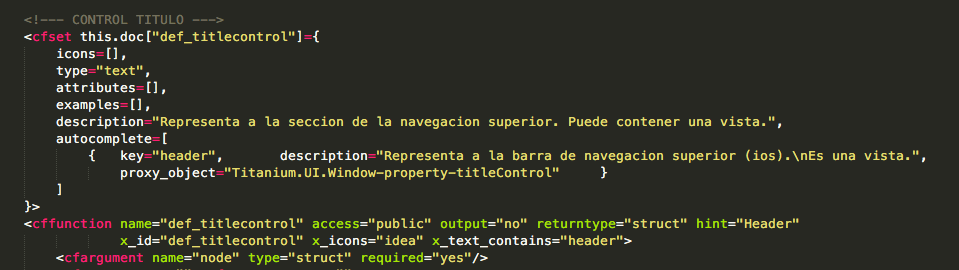
Before: Manual Spanish command definition with hardcoded descriptions and attributes
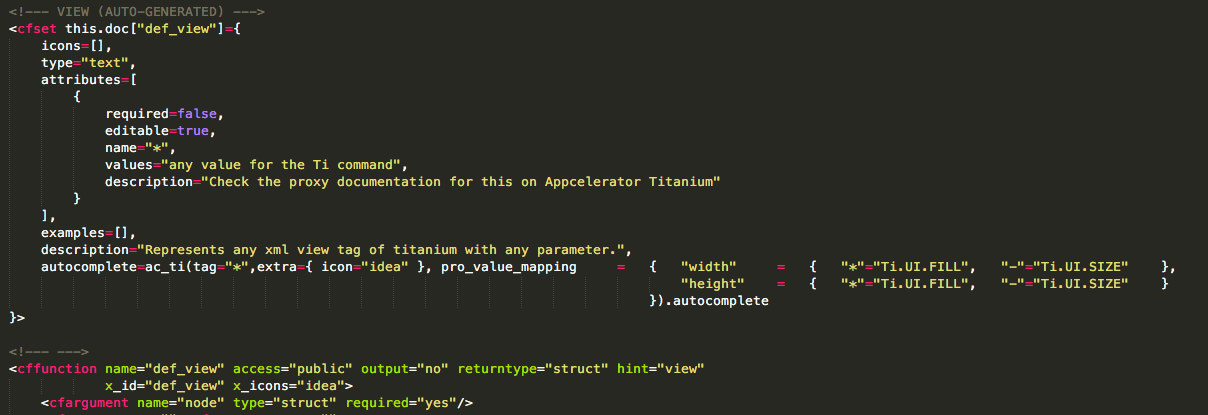
After: Auto-generated view using ac_ti() - pulls documentation directly from Titanium API specs
Key features:
- Auto-updated: New SDK release? Re-run the parser. Done.
- Deprecated handling: Automatically marks deprecated methods
- Consistent: Every command follows the same pattern
- Documented: 380-page manual generated automatically
Results
Before:
- 100+ commands to translate manually
- 1 month estimated time
- Prone to errors and inconsistencies
- Manual updates for each SDK version
After:
- All commands auto-generated in 4 days
- 380 pages of documentation (vs. ~100 before)
- Automatic SDK updates
- Consistent structure across all commands
- Autocomplete support for entire Titanium API
What's left:
The English DSL wasn't production-ready yet. I still needed to add:
- Event handlers (onClick, onChange, etc.)
- Conditionals (if/else logic)
- Control flow (loops, switches)
- Scripting commands (not in api.jsca)
But the foundation was solid. The tedious part was automated.
Early demo of the English DSL parser in action
What I Learned
On automation:
When you find yourself doing repetitive work, stop. Look for the pattern. Can it be automated? In this case, 4 days of automation work saved me 26 days of manual work—and made the system more maintainable.
On leveraging existing tools:
I didn't invent the parsing strategy. I found yomybaby's solution and adapted it. Good developers don't reinvent wheels—they find the right wheels and connect them to their own systems.
On DSL design:
A well-designed DSL shouldn't just parse code—it should be self-documenting. The ac_ti() approach meant every command automatically generated its own documentation, autocomplete, and validation rules.
On perfection vs. progress:
The English DSL wasn't complete after 4 days. Events and conditionals were missing. But I had the core working. Ship the foundation, iterate on the details.
The Bigger Picture
This was part of building Concepto DSL, a visual programming environment that compiled mindmap-like diagrams into working Titanium mobile apps.
The challenge: Titanium's API is huge and constantly evolving. Manual documentation was unsustainable.
The solution: Automate everything that can be automated. Use the framework's own documentation as the source of truth.
This approach later became the template for how Concepto handled all its DSL extensions—not just Titanium, but Vue.js, React, and Node.js backends too.
The lesson: Don't fight your dependencies. Embrace them. If Titanium documents their API in api.jsca, use api.jsca. If they update it, your system updates too.
Use This Approach
If you're building a DSL or code generator:
- Find the spec: Most frameworks have machine-readable API specs (JSON, XML, TypeScript definitions)
- Parse once, generate many: Convert the spec to your internal format once
- Automate documentation: If your code is auto-generated, your docs should be too
- Handle deprecation: Good specs mark deprecated features—use that info
- Version appropriately: Tie your generator to specific framework versions
Tools that inspired this:
- Titanium API Docs↗ - The source of truth
- yomybaby's Atom Titanium↗ - The parsing inspiration
- api.jsca spec↗ - The format itself
Related tools:
If you're building code generators, check out:
- TypeScript's
.d.tsfiles for type definitions - OpenAPI/Swagger specs for REST APIs
- GraphQL schemas for GraphQL APIs
- JSON Schema for data validation
All of these can power automated code and documentation generation.